Adding a bank account for remittance
Kept collects premium payments from your group's COBRA participants each month, and remits them back to you. We do this automatically so you don't have to think about it each month! In order to do so, you must add bank information to your account so the payments can be deposited.
Remittance setup:
Navigate to the Settings tab on the left side of your homepage and go to the Financial tab:
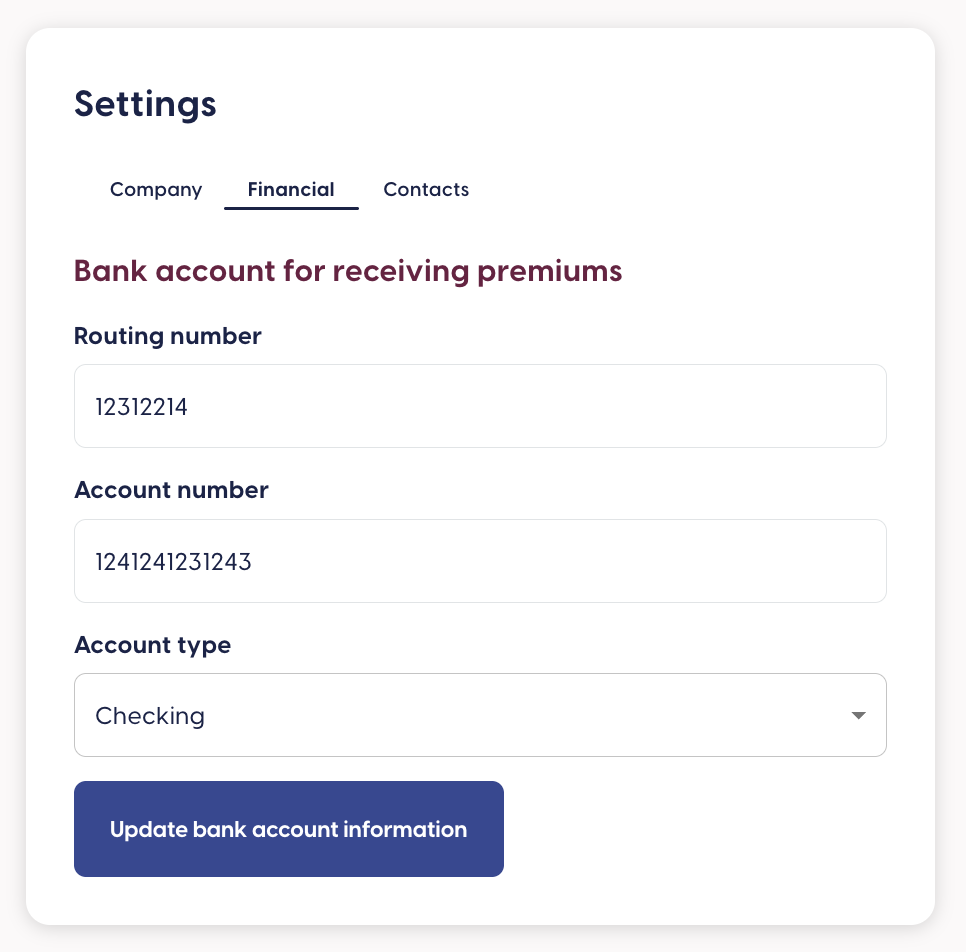
From here, you'll enter in the account information where you'd like the premiums to be deposited. It may take a day or two for your account to be verified, but that's it!
Next, we recommend setting up a recipient for the monthly reconciliation report. All you need to do is simply navigate to the Reports tab on the left side of your homepage and then to the grey Recipients box:

Add the names of whoever on your team you'd like to receive these emails. Monthly, they'll get a report of which employees paid which amounts. This will help you reconcile the amounts against what you've paid your carriers.
Related Articles
COBRA payment remittance
Kept collects monthly COBRA payments from enrollees on your group’s behalf. Around the 20th of each month, you’ll receive a payment from Kept to the bank account you’ve added to your account. This does mean that you will have to float funds for a ...Adding Kept admins
Multiple contacts at your company can act as administrators on your Kept account. To add someone new, you just need their name and email address! Simply login to your Kept account and navigate to the “Admins” tab and complete the “Invite new company ...Login to a Kept Admin Account
Login to a Kept Admin Account If you've been identified as a Kept admin by a broker or another admin within your company, you will receive an email with a link prompting you to accept your invite. After accepting your initial invite, you can utilize ...Login to a Kept Member Account
You'll be notified by email that you have a Kept account. This happens via a secure link in your initial notice email at your first benefits enrollment, or after you have a COBRA qualifying event such as a termination. In the email there will be a ...Add a new group
You can add a new group to your Kept account as a broker in just a few easy steps! First, make sure you're logged into your Kept admin account. Next, click Add Clients from the box at the bottom left of your screen: Finally, complete all the ...